
4.9 KiB
Podman Quadlet: Quay Container Registry
Overview
Quay is a self-hosted container registry started as a Podman Quadlet. It provides image storage, vulnerability scanning, repository mirroring, and proxy caching.
This cookbook runs a complete Quay stack:
- quay-app: The main Quay container registry application.
- quay-clair: Clair vulnerability scanner running in combo mode (indexer + matcher + notifier).
- quay-init-certificate: Initializes TLS certificates before Quay starts.
- quay-load-renewed-certificate: Reloads TLS certificates after Lego renewal.
This cookbook uses PostgreSQL as the database backend (requires the postgresql cookbook), Redis for caching (requires the redis cookbook), and Lego for TLS certificate management (requires the lego cookbook).
Prerequisites
- The
postgresqlcookbook must be installed and running. - The
rediscookbook must be installed and running. - The
legocookbook must be installed and running. - The Quay database and user must be created in PostgreSQL (see
other/postgresql/quay.sh). - The Clair database and user must be created in PostgreSQL (see
other/postgresql/clair.sql). - The Redis ACL for Quay must be configured (see
other/redis/quay.acl). - The nftables firewall rules must be applied (see
other/nftables/50-quay.nft). - Configuration file
/etc/quadlets/quay/app/config.yamlmust exist (seeconfig/examples/app/config.yaml). - Configuration file
/etc/quadlets/quay/clair/config.yamlmust exist (seeconfig/examples/clair/config.yaml).
Usage
In a separate terminal, follow the logs.
sudo make tail-logs
Install the Podman Quadlets and start Quay.
sudo make clean install
You should see the services starting in order:
- quay-init-certificate.service copies or generates TLS certificates.
- quay-clair.service starts the Clair vulnerability scanner.
- quay-app.service starts the Quay registry application.
Access Quay at https://127.0.0.1:8443/.
First login
Bootstrap the initial superuser account:
ADMIN_PASSWORD='ChangeMe!'
curl -vk -X POST https://localhost:8443/api/v1/user/initialize \
  -H 'Content-Type: application/json' \
  --data "{\"username\":\"quayadmin\",\"password\":\"${ADMIN_PASSWORD}\",\"email\":\"root@localhost\",\"access_token\":true}"
Registry Mirroring
Create a dedicated organization for each registry you want to mirror. For example, to mirror Docker Hub:
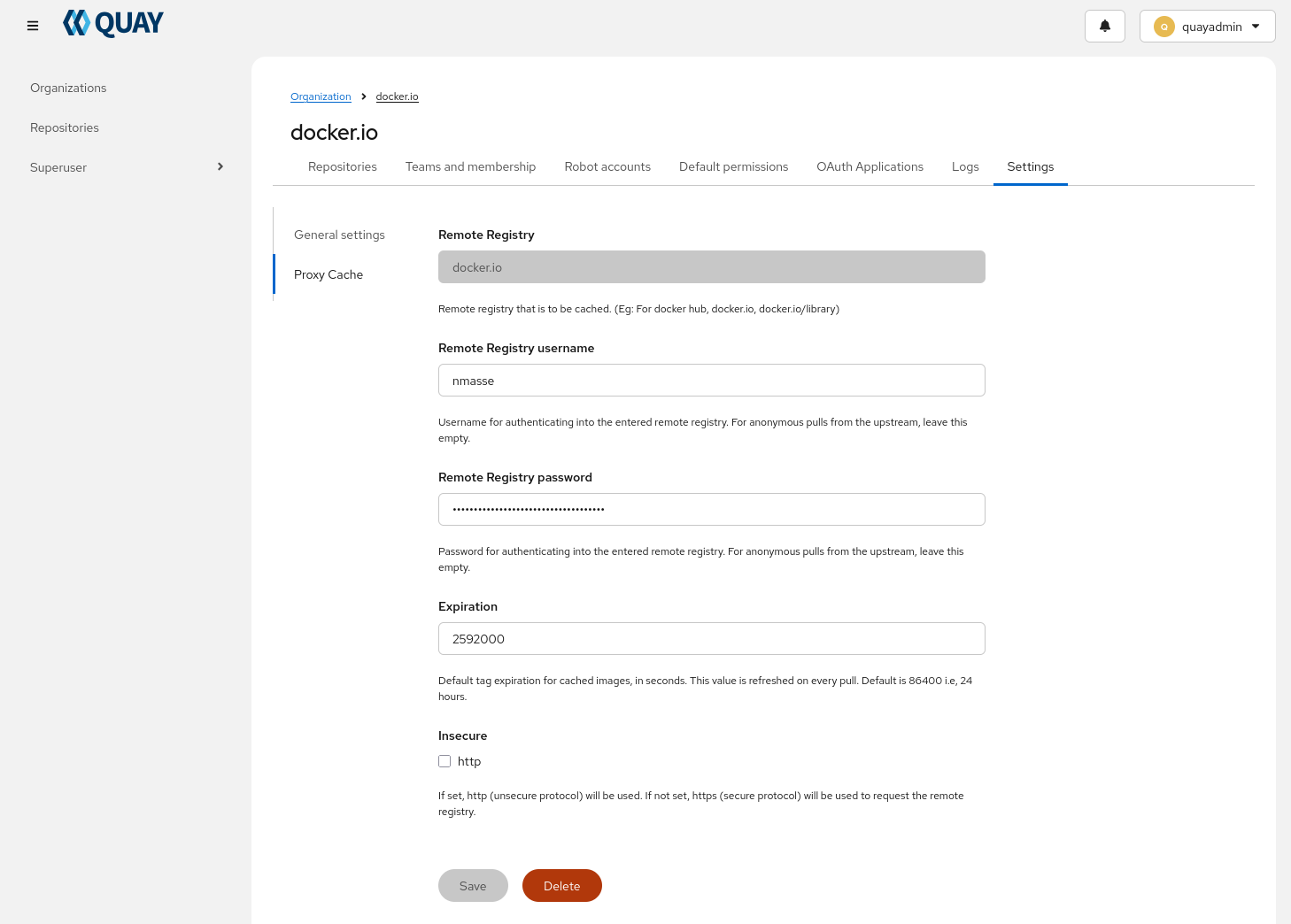
Then, on your clients, create /etc/containers/registries.conf.d/mirror.conf with the following content:
[[registry]]
prefix = "docker.io"
location = "docker.io"

# Optional: block direct access to the original registry to force clients to use the mirror
blocked = true

[[registry.mirror]]
location = "quay.example.test/docker.io"

# Optional: allow insecure access to the mirror if it's using self-signed certificates or plain HTTP
insecure = true
You can verify the mirror is working by pulling an image:
sudo -i # Open a true session so that credentials are not cleared after each command
podman login -u quayadmin -p 'ChangeMe!' https://quay.example.test
podman pull docker.io/library/alpine:latest
The docker.io/library/alpine repository should appear in the Quay UI under the organization you created for Docker Hub.
The image will be cached in Quay after the first pull.
If you want to access Quay from Podman Quadlets or Systemd units, you need to store the credentials in /etc/containers/auth.json:
sudo REGISTRY_AUTH_FILE=/etc/containers/auth.json podman login -u quayadmin -p 'ChangeMe!' https://quay.example.test
And then, in your Quadlet file or Systemd unit, set the environment variable REGISTRY_AUTH_FILE=/etc/containers/auth.json so that Podman can find the credentials when pulling images from the mirror.
[Service]
Environment=REGISTRY_AUTH_FILE=/etc/containers/auth.json
As a regular user, configure the mirror in ~/.config/containers/registries.conf instead of /etc/containers/registries.conf.
And use the following command to login and store credentials in ~/.config/containers/auth.json:
REGISTRY_AUTH_FILE=~/.config/containers/auth.json podman login -u quayadmin -p 'ChangeMe!' https://quay.example.test
[!WARNING] If you enable persistent storage for the credentials, it is safer to generate a read-only robot account in Quay for pulling images from the mirror, and restrict the scope of the credentials to just the mirror repository. This way, if the credentials are leaked, the damage is limited. And if you need to access other parts of the registry read-write, you can login with a regular user account.
REGISTRY_AUTH_FILE=~/.config/containers/auth.json podman login -u robot-account -p token https://quay.example.test/docker.ioAnd when needed, you can login with a regular user account for read-write access:
podman login -u regular-user -p token https://quay.example.test