
 Nicolas Massé
ad7282c6dd
Nicolas Massé
ad7282c6dd
|
4 years ago | |
|---|---|---|
| .. | ||
| cloud-init | 4 years ago | |
| README.md | 4 years ago | |
| label-dimensions.png | 4 years ago | |
| main.tf | 4 years ago | |

README.md
Podman Lab on AWS EC2
Development on local machine
Pre-requisites: Libvirt on Fedora
cd cloud-init
./install-libvirt.sh
Installation on AWS EC2
Pre-requisites:
- Terraform
- OpenSSL
- Bash
- mkpasswd
- gzip
cd cloud-init
./generate-users.sh
cd ..
terraform init
terraform apply
User accounts are in cloud-init/users.csv.
Generate labels with Libre Office
If not already done, install the "database" component of Libre Office.
sudo dnf install libreoffice-base
-
Launch Libre Office Base
-
Select Connect to an existing Database
-
In the dropdown list, select Text
-
Click Browse and select the cloud-init folder
-
Select Comma-separated value files (CSV)
-
Click Next > and Finish
-
Save the database somewhere
-
Launch Libre Office Writer
-
Click File > New > Labels
-
In the Database dropdown list, select your database
-
In the Table dropdown list, select users
-
In the Database field dropdown list, select username and click the left arrow.
-
In the Database field dropdown list, select password and click the left arrow.
-
In the Format tab, enter the dimensions of a credit card (8.56 cm x 5.40 cm).
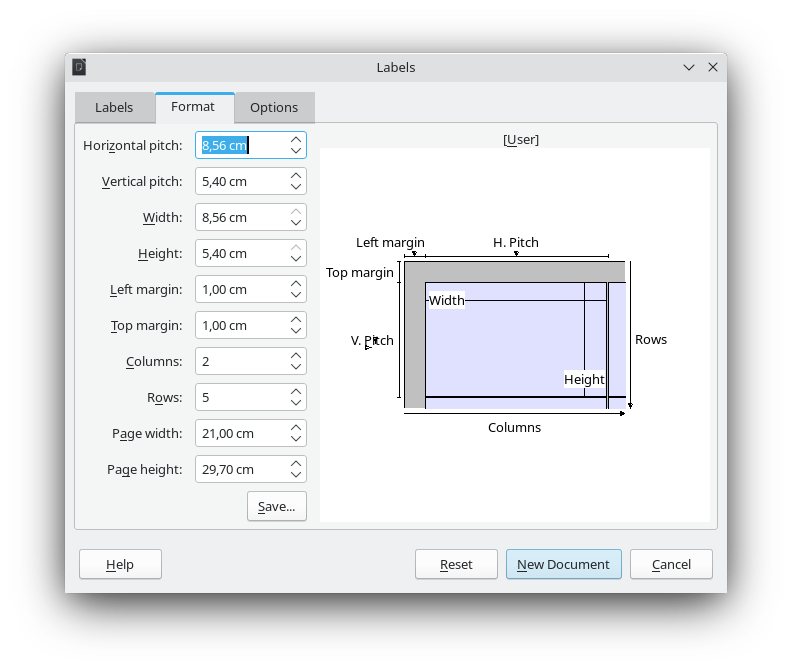
- In the Options tab, select Synchronize contents
- Click New Document
- Format it according to your liking
- Click Synchronize Labels
- In the Mail Merge toolbar, click Save Merged Documents
- Click Save Documents